
01
Your photos stay on your device.
Image processing happens locally. No photo upload is needed to optimize and export. See the privacy policy for account, purchase, and platform services.
Less file size. More room for what matters. Resize, compress, and prepare your photos for wherever they go next.
For iPhone, iPad, Mac, Android & HarmonyOS
 OriginalOptimized
Turn complicated settings into simple choices. Get a little closer to the image you have in mind.
Resize by the short edge, long edge, or your own pixel dimensions. Adjust quality and sharpening to fine-tune the result.
Explore in the app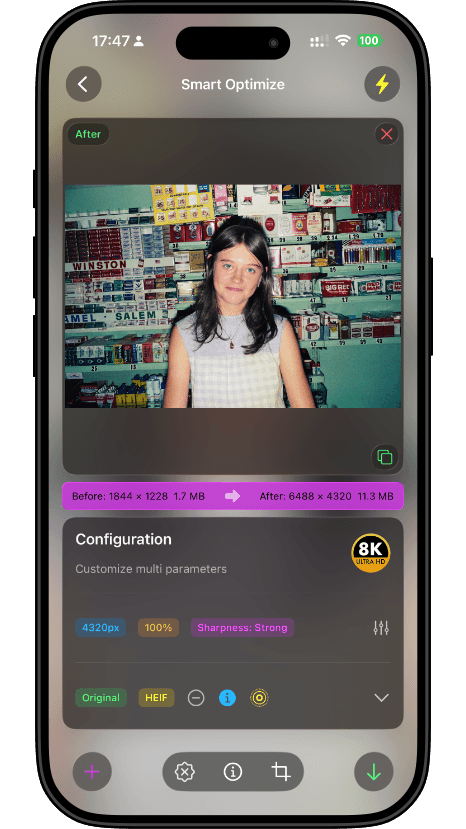 Interface shown: iOS version
Image processing happens locally. No photo upload is needed to optimize and export. See the privacy policy for account, purchase, and platform services.
Add text, a date, or a personal mark with watermark settings. Give your finished images a little more character.
Select multiple images, apply your settings, and export in a batch. Let ImageFit take care of the repetitive part.
Select the images you want to work with.
Choose a scene preset or fine-tune the settings.
Preview the result and export your new images.
ImageFit is available for iOS, Android, and HarmonyOS. The Apple version works on compatible iPhones, iPads, and Apple silicon Macs. Check each store for current device and system requirements.
Your images are processed on your device. You do not need to upload them to a server. Purchases, accounts, and update checks may require an internet connection. See the official privacy policy for details.
Results depend on the original image, format, and settings. Lossy compression changes image content. Adjust quality, dimensions, or target size, and preview before saving. The website comparison is an illustration.
Each platform is developed separately, so features, interfaces, and release schedules can differ. This website follows the iOS design. Check your platform’s app for ID photo, Live Photo, and other feature availability.
Download ImageFit from an app store or an official channel to try it. Free allowances, premium features, subscriptions, and one-time purchases are shown in the app and the relevant store.
Email leavestyle101@gmail.com with your device model, operating system, app version, and a description of the issue. Remove sensitive information before sharing any sample image.
 For your next great share
Choose your device. Make your next image just right.
Features and system requirements vary by platform and version.
Android is also available on Tencent MyApp

